
How Do I Access BAOU Student Login, ABC ID and DEB ID?
Contents
- How to Access the BAOU Student Login Portal?
- How to Download the BAOU ID Card?
- What is the BAOU Enrolment Number?
- What is the BAOU ABC ID?
- How to Create a BAOU DEB ID?
- BAOU Login for Online Degree Form
- What to do if BAOU Student Login Credentials are Lost or Forgotten?
- How to Update Registered Mobile Number or Email ID for BAOU Login?
- What is the BAOU Samarth Portal?
- BAOU Learner Support Centre Login
- BAOU Student Login, ABC ID and DEB ID: official portals and documents
- Questions about BAOU Student Login, ABC ID and DEB ID
Dr. Babasaheb Ambedkar Open University (BAOU), located in Ahmedabad, Gujarat, provides various online portals for its distance learners to manage their academic journey. Students utilize these platforms for tasks such as accessing their Eklavya Student Support Portal, downloading identity cards, and managing degree-related forms. Key identifiers like the Enrolment Number, Academic Bank of Credits (ABC) ID, and Distance Education Bureau (DEB) ID are essential for these digital interactions. The university offers over 100 programmes through open and distance learning, with admissions conducted exclusively online.
How to Access the BAOU Student Login Portal?
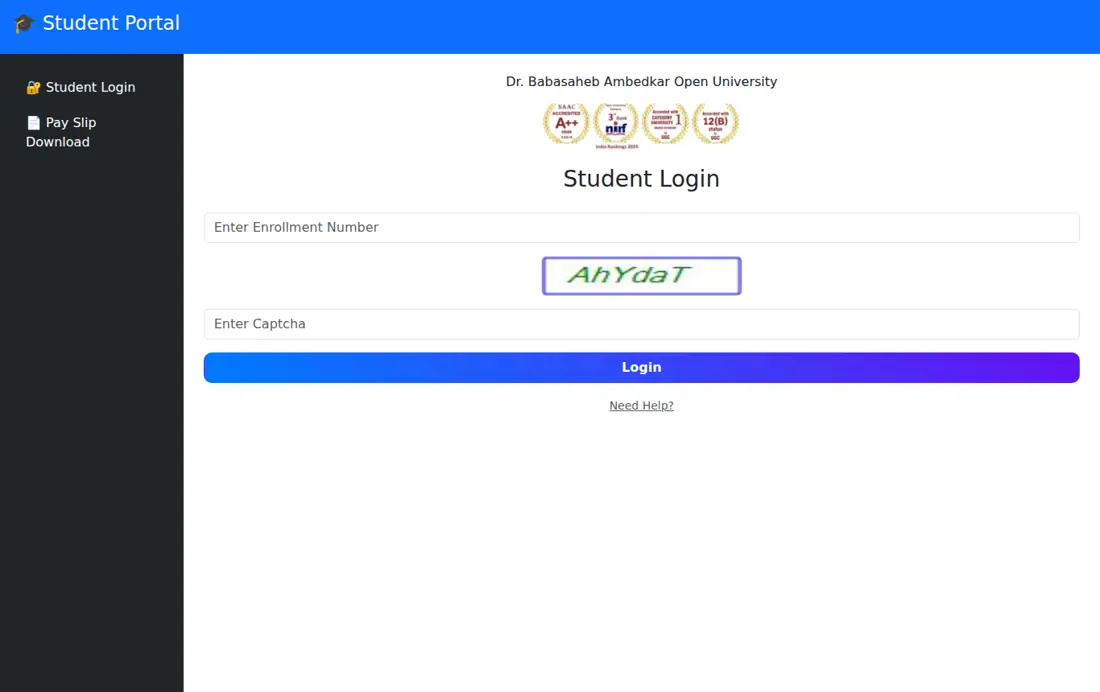
BAOU students can access their primary academic services through the Eklavya “Student Support Portal”. This portal requires students to enter their Enrolment Number and Date of Birth to log in.
The Eklavya portal serves as a central point for students to manage their academic information and access various support services provided by Dr. Babasaheb Ambedkar Open University.
- Open the Eklavya “Student Support Portal” in your web browser.
- Enter your Enrolment No. in the designated field.
- Enter your Date of Birth in DD/MM/YYYY format.
- Click the ‘Login’ button to access your student account.
How to Download the BAOU ID Card?
BAOU provides enrolled learners with photo-identity cards, which are essential for various university processes. Students can download their Student Admission Letter and I-Card from the university website.
This facility is available for all academic sessions that commenced after August 2017, allowing students to retrieve their ID cards if lost or damaged.
- Visit the BAOU website and navigate to the post-admission section.
- Click on the link for downloading Student Admission Letter and I-Card, which directs to the BAOU ERP student login page.
- Log in using your Enrolment Number and Date of Birth.
- Locate and download your I-Card, then print it and keep it safe until your programme is complete.
What is the BAOU Enrolment Number?
The BAOU Enrolment Number is a unique registration number provided to all enrolled learners. This number is crucial for accessing online services, including the Eklavya Student Support Portal and the Online Degree Form.
All enrolled learners receive their registration number, programme guidelines, and photo-identity cards in due course of time after admission.
BAOU: related tasks
What is the BAOU ABC ID?
The Academic Bank of Credits (ABC) ID is a unique identifier required for learners to create their Distance Education Bureau (DEB) ID. This ID helps in streamlining academic credit transfers and recognition.
Students facing issues with their ABC ID or APAAR ID can use the ABC’s Support Ticket System or the DigiLocker app for assistance, or contact the ABC support call center.
- ABC’s Support Ticket System: https://support.abc.gov.in/
- ABC Support Call Center: 18008893511
How to Create a BAOU DEB ID?
Learners enrolled with Dr. Babasaheb Ambedkar Open University must create a Distance Education Bureau (DEB) ID by registering on the official DEB portal. This ID is generated using the student’s Academic Bank of Credits (ABC) ID.
The DEB ID is essential for distance education learners and ensures proper recognition and tracking of their academic progress under UGC guidelines.
- ABCID
- Aadhaar Name
- Birth Year
- Gender (Male, Female, Transgender)
- Provider Present
- Provider Name
- Provider Authentication Mode (PAN Card, Passport, UID, EPIC, Driving License)
- Provider Authentication ID
- Consent Relation
- Consent Place
- Captcha
- Mobile
- Consent checkbox
- Ensure your APAAR/ABC Card information, including name, date of birth, and gender, is correct.
- If corrections are needed, use the ABC’s Support Ticket System or DigiLocker app, or contact the ABC support call center at 18008893511.
- Once your APAAR/ABC Card is confirmed correct, proceed to the UGC DEB portal to create your DEB ID.
- Fill in the required details on the DEB portal, including your ABCID, Aadhaar Name, Birth Year, Gender, and Provider Authentication details.
- Complete the consent fields, enter the Captcha, and provide your Email and Mobile number.
- Check the consent box and click ‘Enter’ or ‘Submit’ to create your DEB ID.
BAOU Login for Online Degree Form
Dr. Babasaheb Ambedkar Open University provides a dedicated online portal for students to apply for their degree certificates. This portal requires students to log in using their Enrolment Number.
Students can access this service to submit their online degree forms and track their application status.
- Navigate to the BAOU Online Degree Form portal.
- Enter your Enrolment Number in the specified field.
- Enter the Captcha code displayed on the screen.
- Click the ‘Login’ button to proceed with your degree application.
What to do if BAOU Student Login Credentials are Lost or Forgotten?
For general inquiries or issues not covered in the Learner Support Centre Handbook, students can contact the Registrar of Dr. Babasaheb Ambedkar Open University for interpretation and decision.
How to Update Registered Mobile Number or Email ID for BAOU Login?
For changes to personal details such as name, address, caste, or study centre, students must submit an application to the university office within 60 days of the admission list publication, along with a prescribed fee and necessary supporting documents.
What is the BAOU Samarth Portal?
The term ‘Samarth’ in the context of Dr. Babasaheb Ambedkar Open University refers to an internal system used for managing information related to Learner Support Centres and Regional Centres. It is not a student-facing login portal.
The Learner Support Centre (LSC) and Regional Centre (RC) Management Department supplies information in the required format for various entities, including Samarth, for administrative purposes.
BAOU Learner Support Centre Login
Dr. Babasaheb Ambedkar Open University provides a separate login portal for its Learner Support Centres (LSCs). This portal is intended for authorized LSC functionaries, not for individual students.
LSCs are established to provide advising, counseling, evaluation, and other assistance to students, and their staff use this login for administrative tasks related to admissions and student support.
- Access the Center Login portal for Learner Support Centres.
- Enter the required credentials, which are specific to authorized LSC personnel.
- Click the login button to access the centre’s administrative interface.
Questions about BAOU Student Login, ABC ID and DEB ID
How to access the BAOU student login portal?
BAOU students can access their primary academic services through the Eklavya “Student Support Portal”. Students need to enter their Enrolment Number and Date of Birth to log in to this portal.
Can I download my BAOU ID card online?
Yes, BAOU students can download their ID cards online from the university website. This facility is available for all academic sessions that commenced after August 2017, using the student login portal.
What is required to create a BAOU DEB ID?
To create a BAOU DEB ID, learners must first have an Academic Bank of Credits (ABC) ID. The DEB ID is then generated by registering on the official UGC DEB portal using the ABC ID and other personal details.
Is there a specific login for BAOU degree certificates?
Yes, Dr. Babasaheb Ambedkar Open University provides a dedicated online portal for students to apply for their degree certificates. Students must log in to this portal using their Enrolment Number and a Captcha code.
What should I do if my BAOU ABC ID has errors?
If your BAOU ABC ID or APAAR ID contains mistakes or missing details, you should use the ABC’s Support Ticket System or the DigiLocker app for corrections. Alternatively, you can contact the ABC support call center at 18008893511 for assistance.
Is ‘Samarth’ a student login portal for BAOU?
No, ‘Samarth’ is not a student login portal for BAOU. It refers to an internal system used by the university’s Learner Support Centre and Regional Centre Management Department for administrative purposes and information management.
What is the official BAOU email ID for student assistance?
Dr. Babasaheb Ambedkar Open University maintains specific email contacts across its departments. General inquiries should be directed to info@baou.edu.in, while online admission support is provided at baou.admission@baou.edu.in. Students requiring assistance with Learner Support Centres can write to baou.lsc@baou.edu.in, and Research and Development Cell queries go to rdc@baou.edu.in.
How do I create and use a username and password for BAOU student login?
Applicants create a username and password on the official Dr. Babasaheb Ambedkar Open University admission portal by registering their name, gender, mobile number, email ID, birthdate, and Aadhaar card number. Registered candidates log in with this username and password to complete form stages and fee payments. For existing student services on the Eklavya portal, login requires an enrolment number and date of birth.
How can students correct personal details in their BAOU registration profile?
Students must submit an application to the university main office within 60 days of the admission list publication to correct personal details. The application must include required supporting documents and payment of the prescribed correction fee to update details like name, address, or study centre.
Key facts
| Primary Student Login Portal | Eklavya “Student Support Portal” |
|---|---|
| Login Credentials for Eklavya | Enrolment No., Date of Birth |
| ID Card Download Availability | For sessions after August 2017 |
| DEB ID Creation Requirement | ABC ID |
| Online Degree Form Login | Enrolment Number, Captcha |
| General University Toll-Free Number | 1800 233 1020 |
BAOU Student Login, ABC ID and DEB ID: official portals and documents
- Access Eklavya Student Support Portallearnerservices.baou.edu.in ↗
- Create or Update DEB IDdeb.ugc.ac.in ↗
- Login for Online Degree Formsupport.baou.edu.in ↗
- Access Learner Support Centre Loginadmission.baou.edu.in ↗
In this section
- BAOU Degree Certificate Download Steps and Tracking Details
- Who Qualifies for a BAOU Scholarship? Categories and Rules
- How to Generate Your BAOU ABC ID Online and Access Student Portals
- BAOU Degree Form Online Application and Certificate Details
- How to Download and Submit the BAOU Name Correction Form
- BAOU ID Card Download Information and Eklavya Portal Login
Everything on BAOU Student Services
Certificates
- BAOU Degree Certificate Download Steps and Tracking Details
- BAOU Degree Form Online Application and Certificate Details
ID & Login
- BAOU ID Card Download Information and Eklavya Portal Login
- How to Generate Your BAOU ABC ID Online and Access Student Portals